
AI is saving time everywhere and money nowhere


Companies have been making enormous investments in AI and crossing their fingers that there's a payoff somewhere down the road. That's backwards. Start with the value you want AI to deliver for the business, change the process to get there, and then decide what technology and skills the new process needs.
Most companies are failing to see returns from AI investments
The world of AI is full of contradictions right now:
- Four in five people who use AI at work say it makes them more productive.1
- However, fewer than four in ten say it has done anything for their company's profits.1 And nearly nine in ten executives say AI hasn't changed their company's productivity at all.2
How can all of this be true at once? People are saving time in pockets, sometimes a lot of it. But organizations haven't rebuilt their processes around AI. So the time each person saves gets absorbed into other work, and AI's effect on the bottom line stays marginal.
We've been here before. In 1987, the economist Robert Solow wrote, "You can see the computer age everywhere but in the productivity statistics."3 The gap between what companies spent on computers and what they got back became known as the Solow paradox, and AI is repeating it.
Electricity went through the same thing a century earlier. When factories first got it, they barely got more productive for decades. The reason was how factories used it. A steam-powered factory ran on one big engine that turned a long shaft along the ceiling, with belts running down to every machine. When electricity arrived, most factories pulled out the steam engine, put one big electric motor in its place, and kept the shaft, the belts and the layout exactly as they were. The gains came only when factories gave each machine its own small motor. With no shaft to hang off, factories could rebuild the floor around the flow of work.4 Picture a factory owner in 1900 calling electricity overhyped while the machines still sat in rows along a shaft the factory no longer needed. That's roughly where most AI programs are today: a powerful new tool running the old process.
Why haven't more companies rebuilt the process? Because they start in one of two wrong places:
- They start with the tool. Fifty-nine percent of organizations add AI to the systems and processes they already have and leave the work itself as it was.5 Some go further and make AI usage a performance goal. Over the past year, several large companies set AI-use targets, and some staff were ranked on leaderboards of how much AI each person used. Staff predictably pushed their numbers up by running AI on trivial tasks.6
- They start with roles. Other companies score every role for how "automatable" it is. They end up with a percentage for each role that nobody can act on. Workforce planners tell us this again and again: you can't hire, move or retrain 80% of a person, or a 20% slice spread across three jobs. AI can speed up 39% of the work in the largest enterprises,7 but that work is spread thin across many roles. When AI saves one person three hours a week, they just spend those hours on other parts of their job. Those hours turn into money only when you add them up across a whole process.
The money shows up when the process changes
So the process is where the redesign has to happen. When AI saves three hours a week for everyone in a single process, those hours add up to hundreds every week. Looking at the whole process also shows you the knock-on effects. If one step gets faster, work piles up at the next one. If one step gets more accurate, the checking after it shrinks. You'd miss both if you looked at one role at a time.
One European telecoms company tried it both ways. When it added an AI "expert" to customer service and left roles and workflows alone, productivity rose 5%. When it redesigned the work around the tool, with new workflows, clear rules for when to hand a case to a person, and training, productivity rose 30%.5
How to redesign a process in five steps
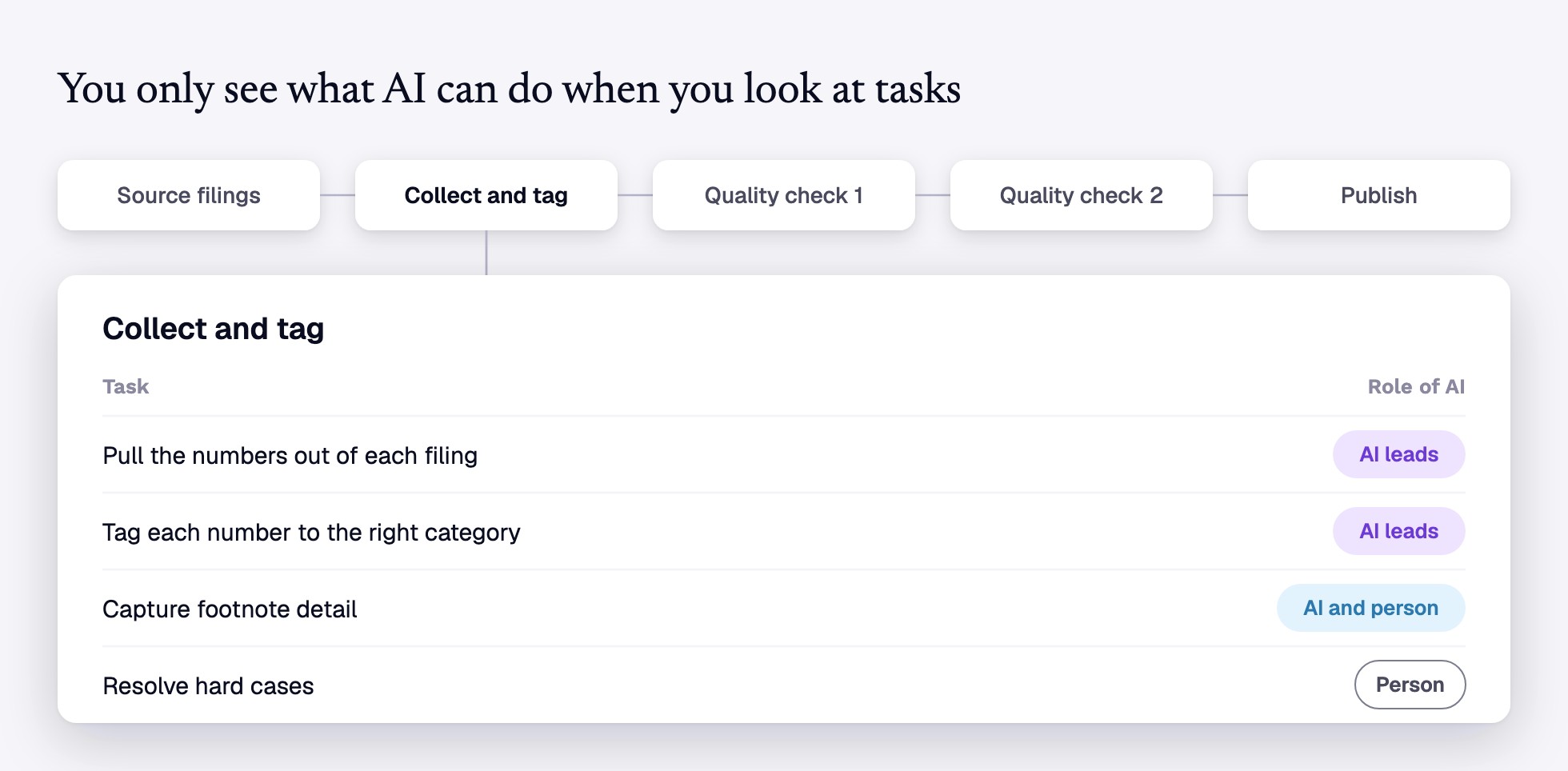
Here's what that looks like in practice. We'll use one fictional example all the way through: a financial services company whose biggest process sources company filings, collects and tags the numbers, runs them through two quality checks and publishes them for its clients.
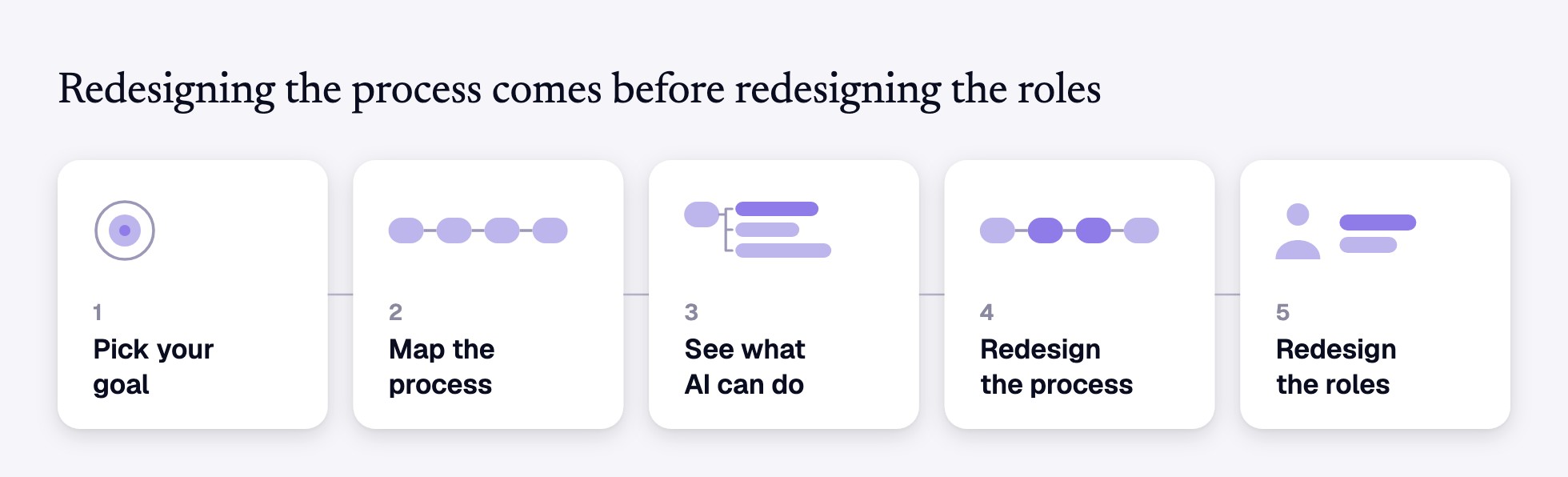
1. Pick your goal
Start by deciding what you want AI to do for the business. Pick a goal you can measure, like cost per case, turnaround time or error rate, and write down where it stands today. This gives you a baseline that you'll judge the redesign against. Most companies aim AI at cutting costs: about eight in ten name efficiency as a goal.1 But AI only saves money when two things are true:
- It has to do the task well enough that people don't have to redo it.
- The AI itself (licenses, token costs, etc.) has to cost less than paying people to do the task.
Cost is only one option. Savings can never be bigger than what the process costs today. The other goals have no such limit, and they can be worth paying for even if the new process ends up costing more:
- AI can make the work faster. A request that used to wait in someone's inbox for a day gets handled in minutes, and steps that ran one after another can run at the same time.
- AI can make the work better. It can check every invoice or claim where people only had time to check a sample, and it catches mistakes before they reach the next person.
- AI can make room for new work. People get time back for the work they do best, like advising clients or taking on the projects you've been turning away.
2. Map the process
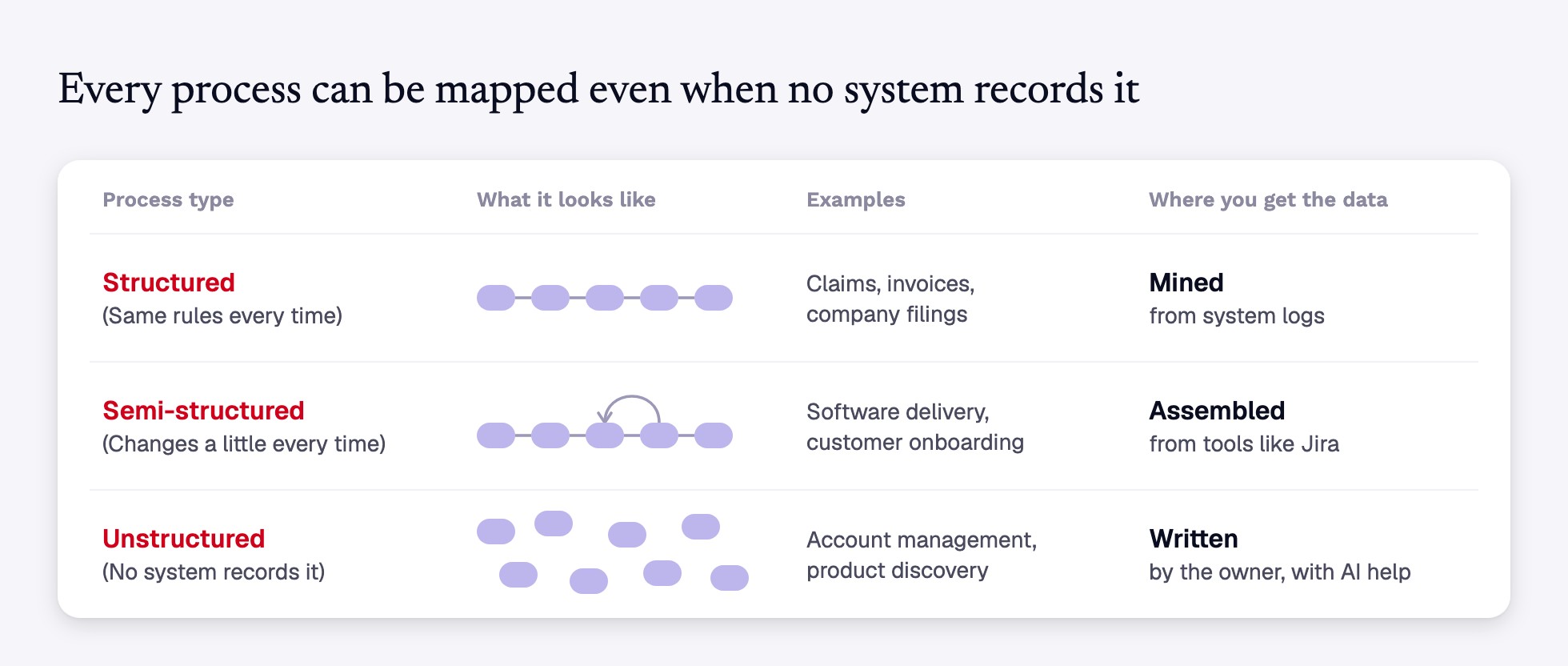
Pick the process your goal depends on most, often your biggest one. Then write down every step, who does it and how long it takes. If your goal depends on more than one process, map each of them. Where you find the data depends on the type of process:
- Structured work that follows the same rules every time. For processes like claims or invoices, process mining software (which reads the logs your systems already keep) usually has the steps and times already.
- Semi-structured work that changes a little every time. For processes like software delivery or customer onboarding, the pieces sit in tools such as Jira.
- Unstructured work that no system records. For processes like account management, the process owner writes the flow down with the help of an AI assistant.
In our example, the process has five steps: source the filings, collect and tag the numbers, run a first quality check, run a second quality check, and publish.
3. See what AI can do with each task
Next, break each step into the tasks inside it. AI works on tasks, so this is where you can see what it can do. Process maps show steps and job descriptions show jobs, but few companies track the tasks inside them. In our example, the step "collect and tag" includes pulling the numbers out of each filing, tagging them to the right categories and resolving hard cases (filings that don't fit the usual pattern).
For each task, decide how much of it AI can handle. We start from the Human Agency Scale, developed by Stanford researchers8 (see our previous article for more detail), and sort each task into one of three groups: AI leads it, AI and a person share it, or a person does it.
Treat these ratings as a first draft and have the people who do the work check them. They know which tasks need judgment AI can't provide. Their corrections often lower the expected savings, and it's better to learn that before the business case is approved.
4. Redesign the process to hit your goal
Now sketch two or three new versions of the process. An AI assistant can help: give it your process map and task ratings, and ask it to draft a few versions for you to refine. For each version, add up the time spent on tasks AI can lead or share, using your ratings from step 3. Then estimate how much closer each version gets you to your goal, such as lower cost, faster turnaround, fewer errors or more time for new work, and pick the one that gets you closest.
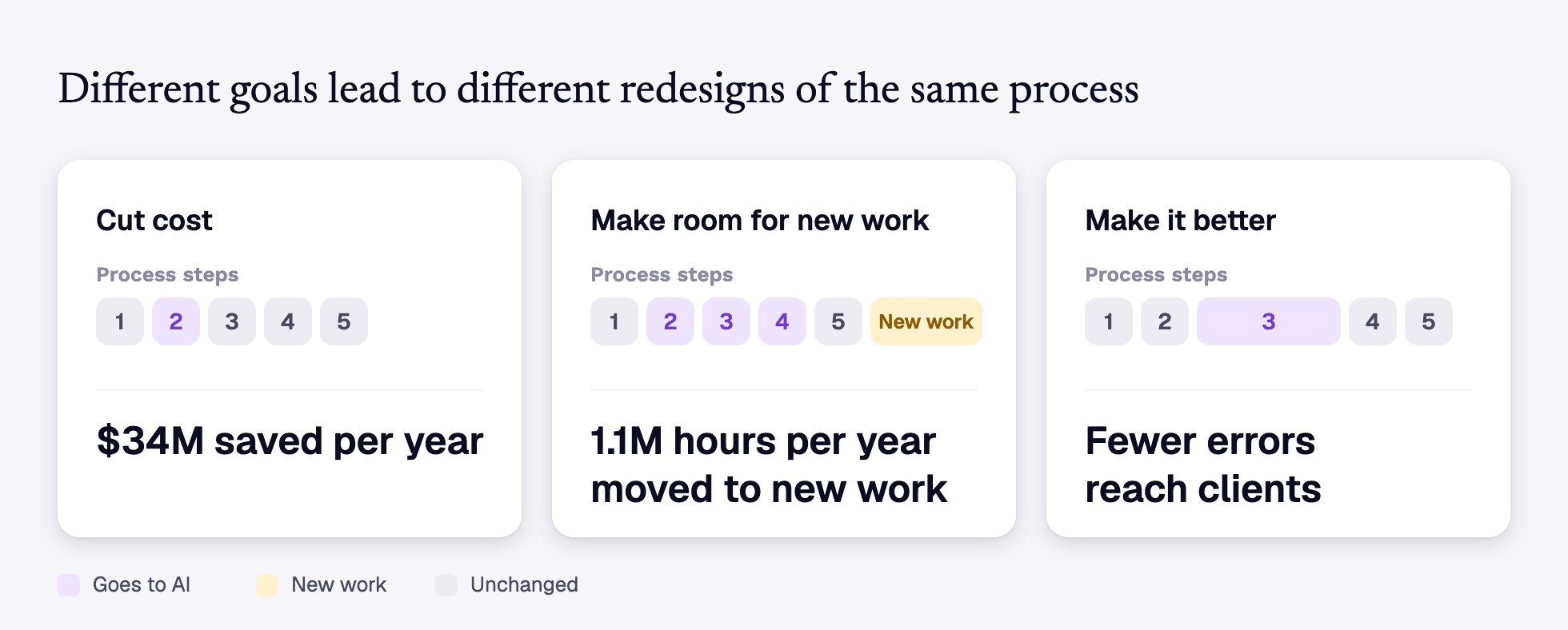
The right redesign depends on your goal. To show how much, here's how the process in our example would change under three different goals:
- Cut cost. AI takes over collecting and tagging the data, the biggest step, and the hours per filing drop. But work now reaches the first quality check faster than the team there can handle it, so filings pile up waiting and clients get their data no sooner. The savings stay limited to the one step AI took over.
- Make room for new work. AI handles collecting and tagging and both quality checks, and people spend the freed time on client advice, hard cases and supervising the AI. Client advice gets the biggest share of the freed time, with some savings on top. This redesign also changes what the team needs to be good at.
- Make it better. At the first quality check, AI checks every number against what the same filer reported in past years and flags anything unusual, where people only had time to check a sample. Costs may not drop, but fewer errors reach clients, and there are fewer corrections to publish later.
5. Redesign the roles last
The new process changes which tasks people do, so the roles have to change with it. Start from the new process, since today's job descriptions reflect the old one. Build each role from two things: the work the new process still needs people for, and the new work it creates. Then decide who moves into each role. Look first at the people who do the work today, since they know the process best, and find a few who are keen on the new way of working. They can show their colleagues how it works and help the change take hold.
In our example, take the data extraction analysts, the people who pull the numbers out of each filing and tag them. In the redesign scenario that makes room for new work, AI does most of the collecting and tagging. The analysts keep the hard cases and pick up new work: supervising the AI, setting the rules it follows, approving each batch of data before it's published, and advising clients. As a result, the skills the role needs change. Reading filings and tagging data matter less. Judging hard cases, checking AI output and advising clients matter more.
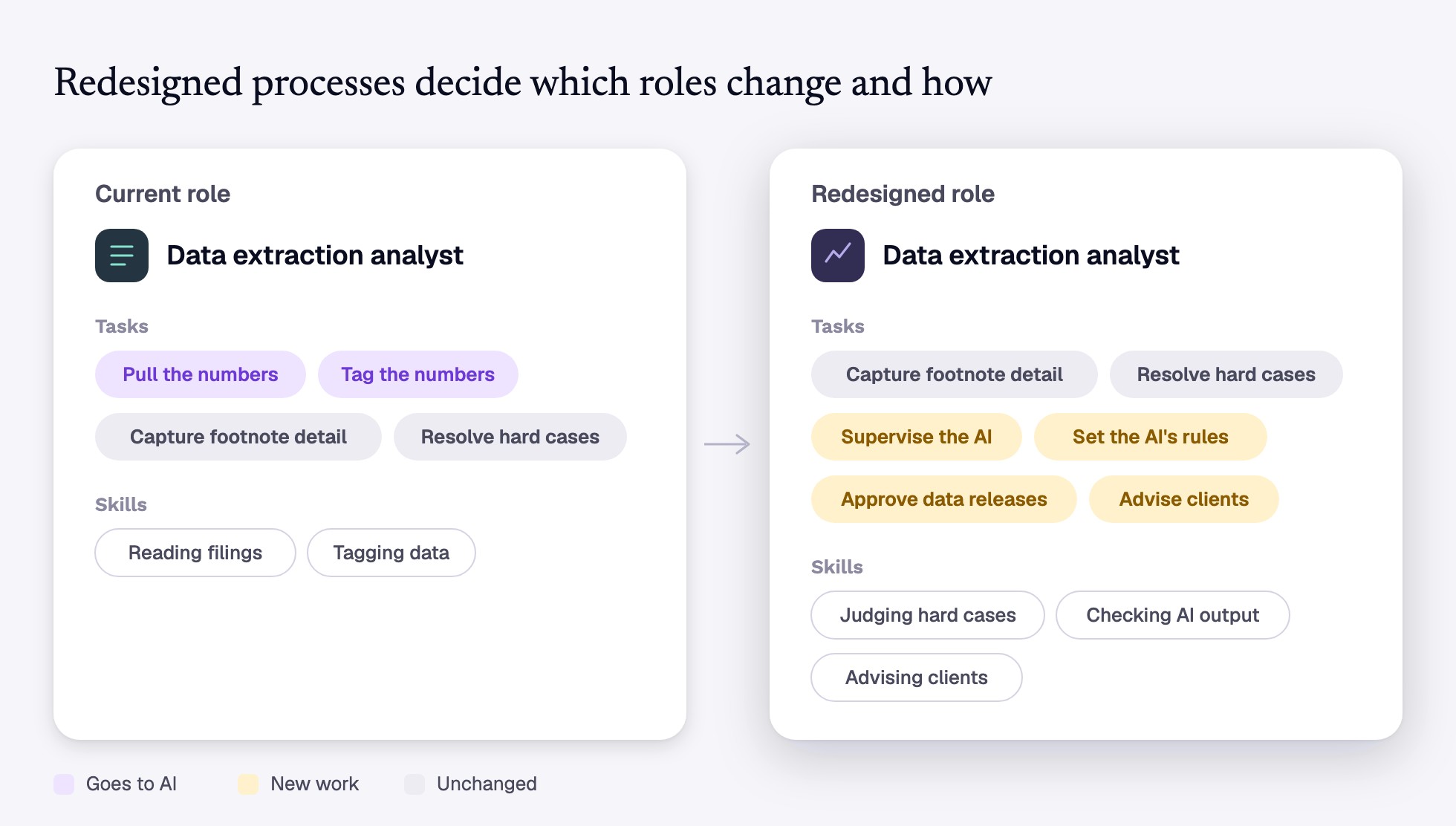
Two consequences apply well beyond this example:
- Entry-level hires need a different way to learn the job. The routine work AI takes over was often how new hires got their training. In our example, new analysts learned by collecting and tagging. The redesigned role asks for judgment from the start, so the bar for new hires goes up. Training has to change too. Give new hires hard cases early, with an experienced colleague reviewing their decisions as they go. That reviewing takes real time, so make coaching part of the senior roles you redesign.
- Your job architecture will fall behind. Many companies rebuild their catalog of roles and job descriptions every few years, and AI is changing the work faster than that. You don't need to wait for the next rebuild. The redesign from step 4 shows which roles changed, so update those roles and leave the rest alone.
The choice in front of you
Factories could keep the old layout or rearrange the floor around the flow of work. The gains came only when they rearranged, and that took decades. AI is putting the same choice in front of you now. You can keep running the old process with a powerful new tool and keep reporting time savings nobody can find in the budget. Or you can pick a goal, rebuild one process around it, and let the roles follow. The first is what most companies are doing. The second is where the money is.
Sources
- Tinkoff, D., Van der Veken, L., Chui, M., & Balakrishnan, T. (2026, August). The state of AI in 2026: On the road to ROI. McKinsey & Company.
- Yotzov, I., Barrero, J. M., Bloom, N., Bunn, P., Davis, S. J., Foster, K. M., Jalca, A., Meyer, B. H., Mizen, P., Navarrete, M. A., Smietanka, P., Thwaites, G., & Wang, B. Z. (2026). Firm data on AI (NBER Working Paper No. 34836). National Bureau of Economic Research.
- Solow, R. M. (1987, July 12). We'd better watch out [Review of the book Manufacturing matters: The myth of the post-industrial economy, by S. S. Cohen & J. Zysman]. New York Times Book Review, 36.
- David, P. A. (1990). The dynamo and the computer: An historical perspective on the modern productivity paradox. American Economic Review, 80(2), 355-361.
- Deloitte. (2026, March). Getting human and machine relationships right. In 2026 Global Human Capital Trends. Deloitte Insights.
- Roytburg, E. (2026, May 12). 'That doesn't sound very healthy': Amazon's reported tokenmaxxing might gamify AI usage, analyst warns. Fortune.
- TechWolf. (2026, September). You're preparing for the wrong AI event.
- Shao, Y., Zope, H., Jiang, Y., Pei, J., Nguyen, D., Brynjolfsson, E., & Yang, D. (2025). Future of work with AI agents: Auditing automation and augmentation potential across the U.S. workforce (arXiv:2506.06576). arXiv.
Let’s get talking
We believe great conversations lead to great solutions. Let’s connect and see how we can help.
Blog
From guides to whitepapers, we’ve got everything you need to master job-to-skill profiles.
AI is saving time everywhere and money nowhere


Start with the work: why Colt chose TechWolf to build its skills foundation

.png)
Weeks, not months: how Chiesi rebuilt the foundation for its workforce transformation