
You're preparing for the wrong AI event


AI will cut fewer jobs than your board thinks
Somewhere in your company, there's a committee planning for an AI headcount event. It has a workforce model, a hiring-freeze scenario, and a slide that estimates how many roles AI will replace. That committee is wasting its time.
To find out what the work itself says, we broke the jobs at 1,496 large enterprises down into their tasks using 2 billion public job postings. Then we scored every task on a simple question: can AI absorb this work, can it accelerate it, or does it stay human?
How we measure this
We analyzed 2 billion public job postings to reconstruct the task profiles of roles at 1,496 of the world's largest enterprises. Each task was scored on the Human Agency Scale, a five-level framework developed at Stanford (Shao et al., 2025):
- H1, AI-led: AI can do the task with minimal human input
- H2, AI-assisted: AI does most of the work; a person guides it
- H3, equal partnership: person and AI contribute equally
- H4, human-led: a person performs the task; AI supports
- H5, fully human: no meaningful AI role
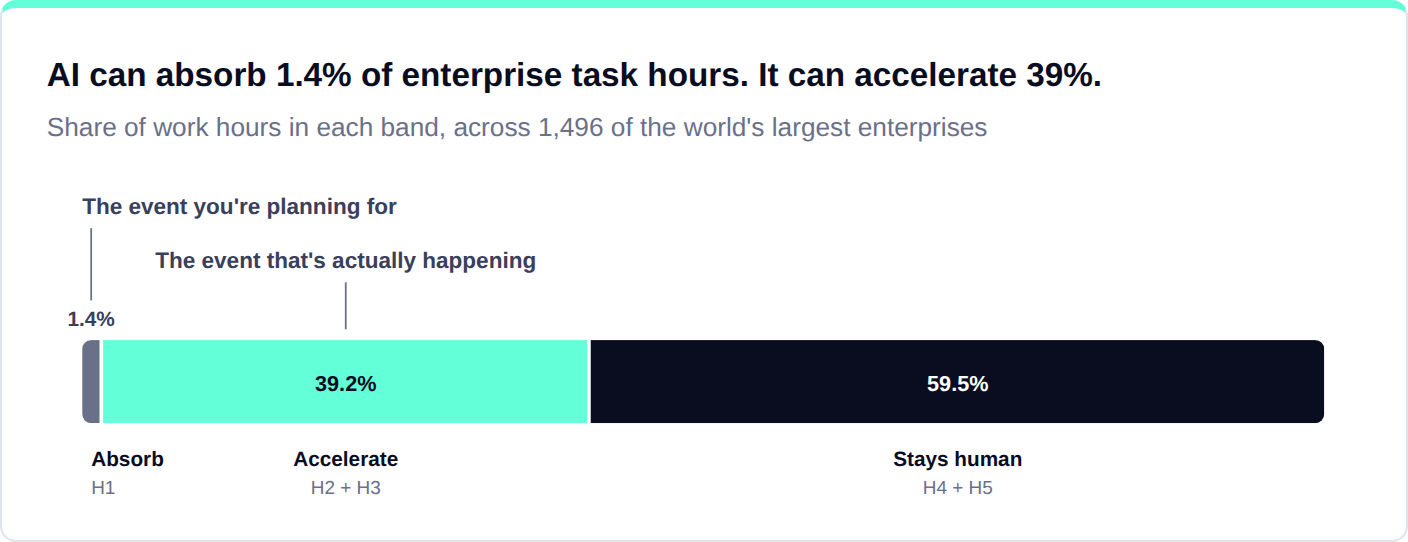
In practice we grouped these into three bands: what AI can absorb (H1), what it can accelerate (H2 and H3), and what stays human (H4 and H5).
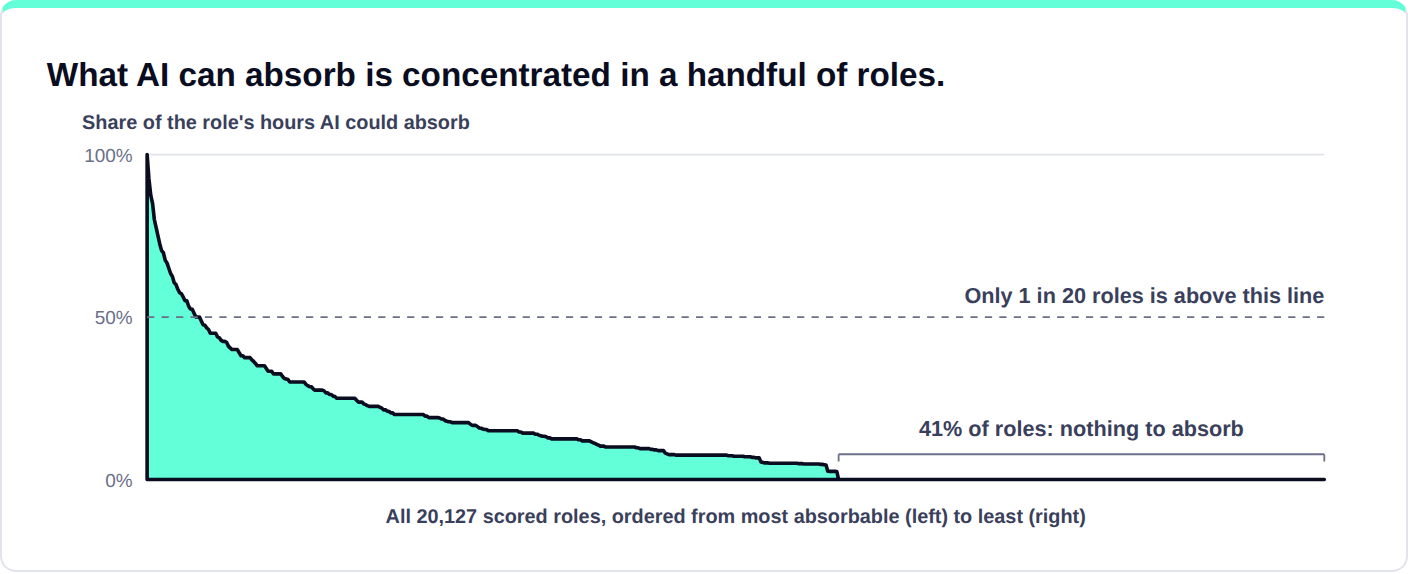
The vast majority of work cannot be automated outright. Only 1.4% of task hours are work AI could take over end to end. Looking at the role level: AI could take over at least half the work in just 1 in 20 roles. In 2 out of 5 roles, AI cannot completely take over any of the work.
A large share of work can be accelerated with AI. AI can accelerate 39% of work on tasks such as first drafts, research, data pulls, summaries, and tracking. For these tasks, humans are in the driver's seat while AI does a real share of the work. This work is already being reshaped inside job titles that look unchanged from the outside.
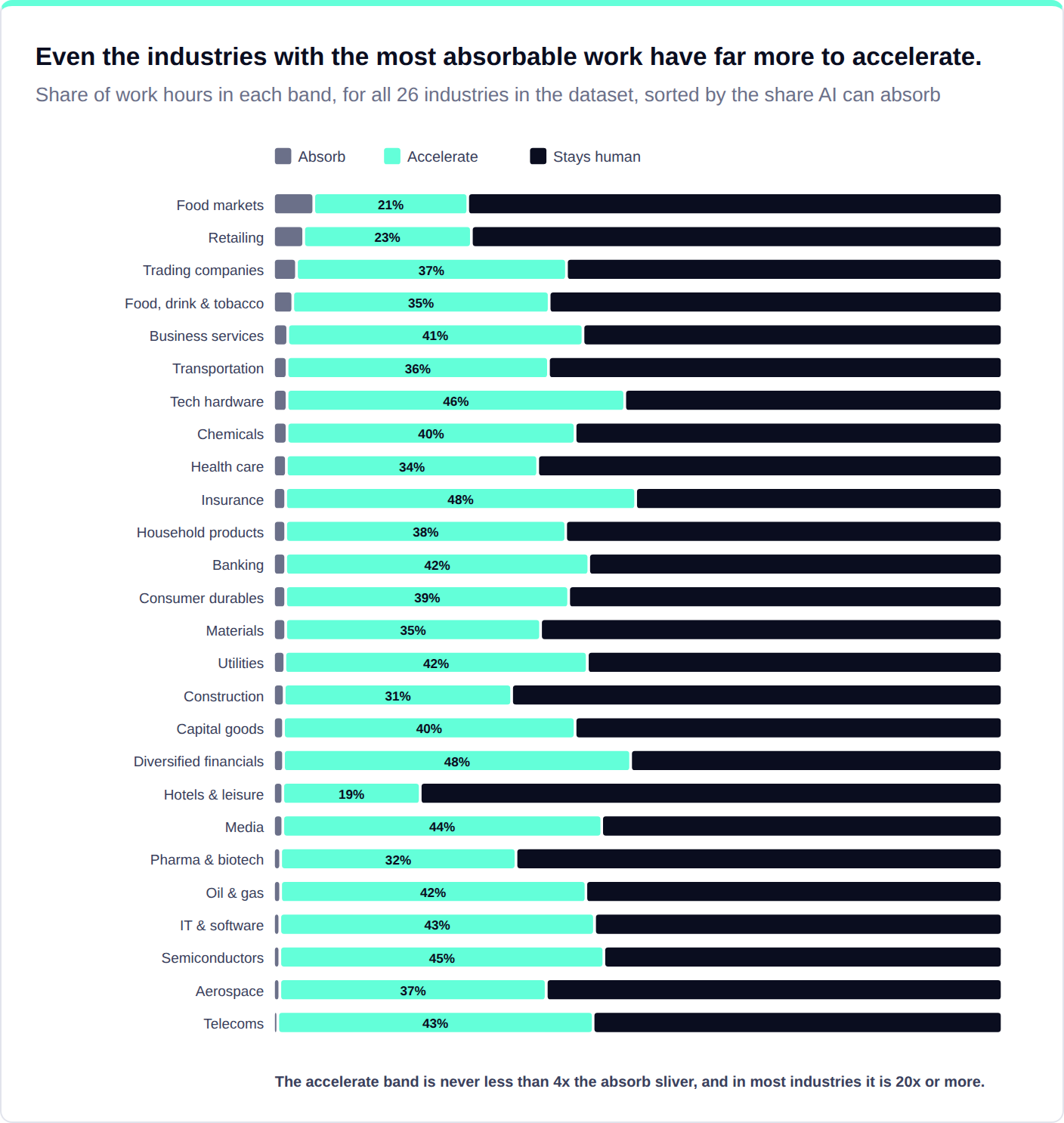
This is true even in the most automatable industries. Only about 4-5% of task hours can be absorbed by AI in food markets and retail. Meanwhile, AI can accelerate over 20% of task hours in these industries. Across all other industries, absorbable work never reaches 3% of hours, while acceleration potential runs from 19% to 48%. Wherever you sit, acceleration is by far the bigger opportunity.
Now put those numbers next to where leadership teams pay attention. The headcount committee is working on the 1.4%: the work AI can absorb. The 39% AI can accelerate has no committee at all. In most companies, nobody owns it, budgets for it, or measures it. When that much of the work changes, roles have to change with it. And the standard tool for updating roles moves far too slowly: most enterprises refresh their job architecture (the official catalog of roles and job descriptions) every five to ten years, in a consulting project that takes more than a year and can cost millions. AI is changing the work faster than that cycle can even see it.
The better option: redesign roles and reinvest the hours AI frees up
The bigger opportunity is the 39% of work that AI can accelerate today inside roles that stay. Redesign those roles and the freed hours become capacity: more time for clients, for judgment calls, or for managing the backlog. That's the AI upside, and it never shows up on a headcount plan.
That kind of redesign starts with one question: what do your people actually do all day? It sounds like something every company should know, but almost none do. Job titles and descriptions won't tell you. Most were written years ago for grading and hiring, and the work has long since moved on. You can only redesign a role from its actual work: the tasks that fill the week.
Take one title: underwriter. We scored the same role at three global insurers, task by task, asking how much of the posted job AI could absorb or accelerate. At the first, 90%: the posted role is mostly risk analysis, quote generation, policy binding, and documentation. At the second, 55%: pricing analysis, claims forecasting, and client reporting could go to AI, while risk judgment and renewals stay. At the third, 0%: as posted, that job is portfolio strategy, client relationships, and mentoring, top to bottom. Under the same title, those are three different jobs.
Executives who see their own workforce broken down into tasks for the first time say versions of the same thing. The CHRO of a North American technology company, after a task-level analysis of their own workforce: "About 70 to 80 percent of the jobs and skills between Sales Engineering and Product Engineering are actually similar, which none of our leaders knew." Three thousand engineers shared identical titles and did vastly different work.
The pattern repeats across all 1,496 companies. What AI can take over is the structured, repeatable middle of a job: routine analysis, quoting, documentation, reporting. What stays human is consistent: client relationships, negotiation, mentoring, and owning decisions.
How to claim the role redesign payoff
Run the redesign one role family at a time (all the variants of one job; think underwriters or store managers). A few dozen families cover most of a large enterprise, and the family is where redesign decisions actually get made. The companies getting value from role redesign share five practices:
- Attach the redesign to something already moving. Role redesigns tied to a live initiative (e.g., an upskilling program, a cost program, a new operating model) get adopted while redesigns pitched on data alone stall. A global telecoms-equipment company started with an AI upskilling program for an HR business-partner role, then realized the program only worked if the role changed with it. Upskilling tells people what to learn. Redesign tells them what the job becomes. This company did both together.
- Score every task and model options with risks attached. Score each task (absorb, accelerate, or stay human), then model two or three ways the role could be redesigned, each with its risks. At a specialty insurer, the workforce-planning lead ran every role this way, using an AI system that scores a role's tasks and drafts redesign options. She started wide ("what is possible"), refused to steer it toward her own hunch, and pressed it for options. Every role ended with potential actions: boost output with the same team, deliver the same with fewer people, or reshape toward where the market is going, laid out side by side for the executive team. After a year of abstract AI discussions, that step made the conversation concrete enough to take to their CTO. And it was fast: mapping one function used to be a 12-week consulting engagement; the system scored the whole enterprise in days.
- Rebuild the role around the work only people can do. Removing the absorbed tasks is the easy half. The real design decision is what the job becomes: pick the human work that deserves more of the role's time, and rebuild the job description around it. The telecoms team wrote a from-to for the role, each part of the job as it was next to what it becomes, and aimed the recovered time at consultative work with the business. Then they validated the new role with the business and with the managers who own its definition.
- Turn the redesigned role into a training plan. Skills are what companies hire for, train for, and promote against. When a role's tasks change, its skill profile changes too, and that new profile is the most concrete target an upskilling program can get. The telecoms company ran it exactly that way: the redesigned role told their AI upskilling program which skills to build, and a simple rule kept it manageable: one skill out of the profile for every skill that came in, the incoming one usually about working well with AI.
- Track the freed hours, and plan where people go next. Track two numbers: the hours still going to work AI could absorb, and the hours redeployed to human-led work. The first should fall; the second should rise. Almost nobody measures this yet; the first companies that do will have the most credible AI story in their industry. And plan on redeployment, because attrition won't keep up: in the companies we've modeled, AI frees up capacity about three times faster than people naturally leave. The specialty insurer's AI-enablement executive worked this way. He took the five-level task scores his team had produced and translated them into three words leaders could act on (automate, augment, humanize), set targets his team could actually hit (below what the scores said was possible), and modeled the freed capacity into a multi-year redeployment plan. His team's operating rule: people were already doing different work; the official job description catches up later. Where a real capacity gap remained, they decided deliberately: buy, build, borrow, or bot (hire it, grow it, rent it, or automate it).
Start with one question
Ask one question about your three largest role families: task by task, what can AI absorb, what can it accelerate, and what stays human?
The organizations that can answer it, and then redesign their roles around what they find, will be the first to turn AI from a slide into business results.
References
Shao, Y., Zope, H., Jiang, Y., Pei, J., Nguyen, D., Brynjolfsson, E., & Yang, D. (2025). Future of work with AI agents: Auditing automation and augmentation potential across the U.S. workforce (arXiv:2506.06576). arXiv. https://doi.org/10.48550/arXiv.2506.06576
Blog
From guides to whitepapers, we’ve got everything you need to master job-to-skill profiles.

AI is saving time everywhere and money nowhere


Start with the work: why Colt chose TechWolf to build its skills foundation

.png)
Weeks, not months: how Chiesi rebuilt the foundation for its workforce transformation